
Creating a record
You can create a new record for a collection by calling.create([arg1, arg2, etc]) on your collection (as defined by the collection schema constructor function).
This will call the constructor function of your collection, and
create a new record (as long as the id of the record does not already exist).
Updating a record
You can update collection data using the collection methods defined in the collection.Permissions
You can control who is allowed to make changes to a record by using thectx.publicKey which is set to the publicKey of the user that signed the
request.
A common use case is to store the ctx.publicKey of the user who created the
collection, and then use this to determine if the change is valid.
For example:
Signing Requests
To sign requests from the client, you must define a signer function that will be called for every request.null to skip
the signing process.
Using wallet through an extension
You can use the signing process provided by a user’s browser extension (e.g. Metamask). Using this approach, every write must be individually approved by the user (i.e. a dialog will appear for them to approve), which may not be an optimal user experience.Creating your own wallet
To improve the user experience, you can create your own app-owned wallet (public/private key pair), allowing you to sign requests without asking the user every time. The wallet/privateKey can then be encrypted using the browser extension, and stored locally or any other storage system. That means you only need to ask the user a single time for permission to decrypt the private key, and then use that private key to sign every subsequent request.Encrypt data
All data on Polybase is publicly accessible (like a blockchain). Therefore it is important to ensure private information is encrypted. You can encrypt data however you like, including using a user wallet’s public key.Using wallet through an extension
You can send a request to Metamask (or other compatible wallet) to obtain an encryption key which can be used to encrypt values. However, decryption is only possible by sending a secondary request to the wallet (which results in the permission popup) to ask for permission for each value to be decrypted. This can result in a poor user experience if there are a number of different values to decrypt, as the user will have to give permission separately for each value. Here is an example:Creating your own wallet
You can create your own app-owned wallet (public/private key) allowing you to encrypt/decrypt values without having to ask the user for explicit permission each time. The private key should be encrypted using a users existing wallet or a password, but rather than encrypting a specific value, you encrypt the new private key. That means you only need to ask the user a single time for permission to decrypt the private key, and then use that private key to decrypt all other values. It is then your responsibility to ensure that the encrypted private key is kept safe, which could be either stored locally in browser storage or in Polybase. Here is an example:Store locally
You could store the encrypted private key locally on the browser device (e.g. in local storage). The tradeoff is that the private key could easily become lost if the user resets their browser (which would make all data unavailable and there would be no recovery method), and it would be difficult for users to work across devices.Store on Polybase
You could store the encrypted private key on Polybase, this allow the encrypted private key to obtained by the user and then decrypted on any device.Multi User Encryption
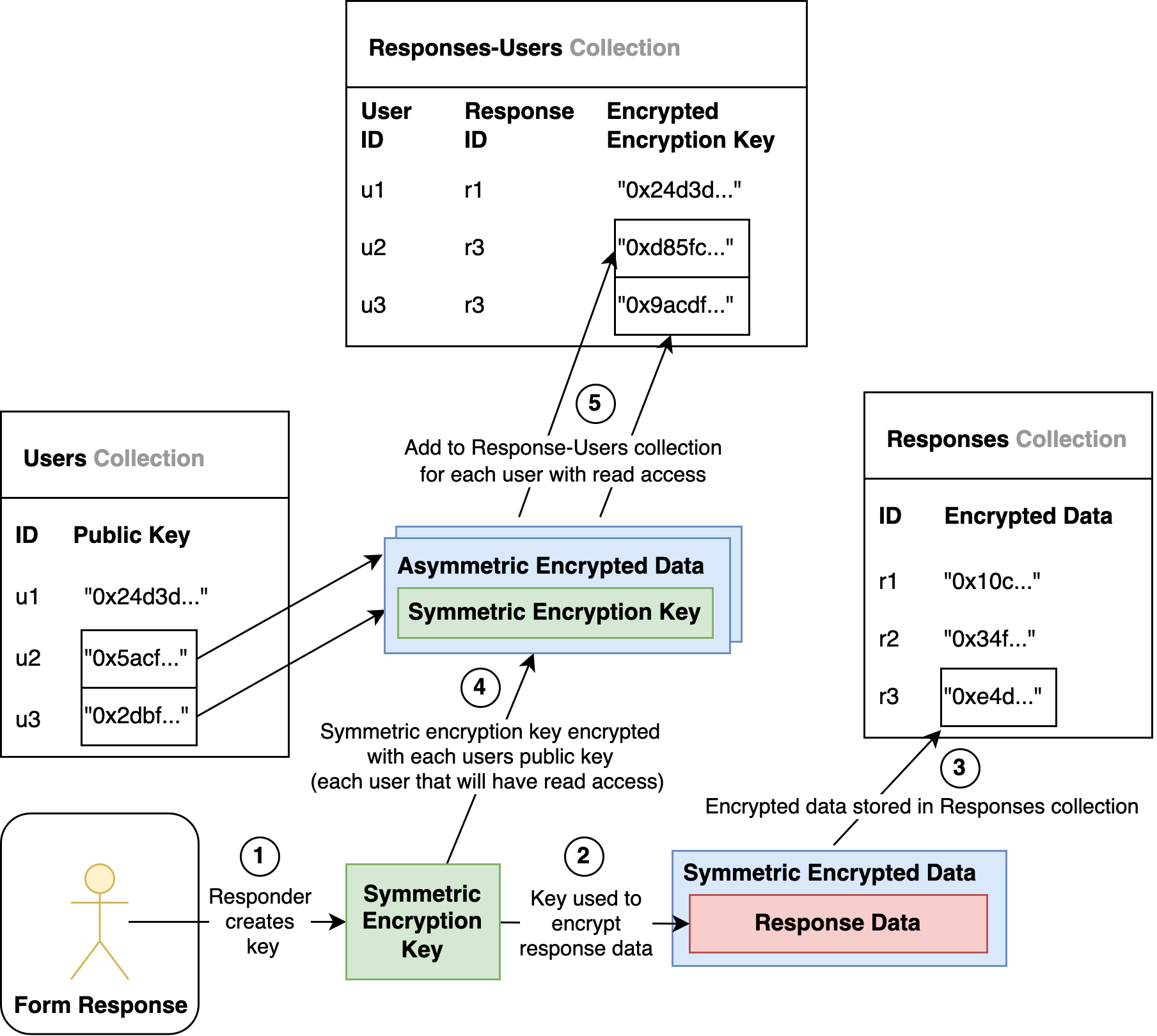
It’s often useful to allow multiple users to decrypt and view data stored in Polybase. To do this, you should:- Create a symmetric encryption key and encrypt the data with that key
- Encrypt the symmetric encryption key with the public key of each user who should have read access
Example
The following shows an example of how you might create a Google Forms product.Overview